RBX Counter: Calculator & Tips
- 0.0
- Rating
- 100.00K
- Installs
- Free
- Price

 Analysis by App-foxy
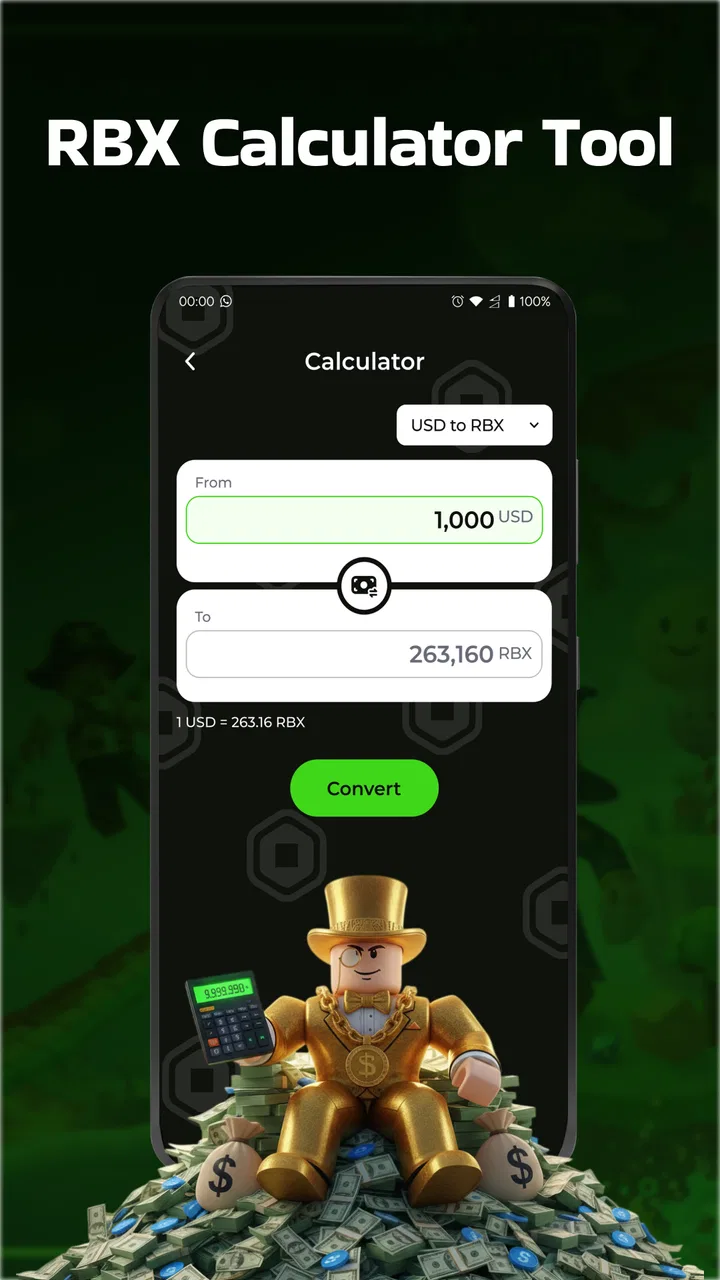
RBX Counter: Calculator & Tips is the kind of small utility I would open when I need a clearer way to keep track of RBX-related figures. It is listed in the Libraries & Demo section, but I found its practical purpose much narrower than a typical library app: it is aimed at counting, calculating, and organizing RBX information in one place. That focused approach makes it easy to understand, although it also means the app is useful only if RBX tracking is genuinely part of your routine.
The app is free and carries an Everyone age rating, so it is approachable for a broad audience. It comes from NINH HOA URBAN JOINT STOCK COMPANY and is currently at version 1.0.1. Its listing shows more than one hundred thousand installs, while the displayed average rating is 0.0. I would treat that rating carefully rather than using it as a definite verdict: the install figure suggests that people have tried it, but the visible rating does not yet give me meaningful feedback about long-term satisfaction.
Getting from installation to a useful first result
I’d use this section to make the first session deliberate rather than just tapping around: choose one figure whose meaning you already know, enter it, and check a simple calculation against the original source. That gives you a practical way to judge whether the counter fits your routine before you rely on it for repeated tracking. Next, I’d look at what the app’s guidance can—and cannot—tell you.
You May Also Like

 Blood Strike: 2.5 Anniversary
Blood Strike’s Loadouts Turn Every Drop Into a Tactical Gamble
A close look at Blood Strike’s custom loadouts: how fast access to signature weapons reshapes its battle royale rhythm, rewards preparation, and narrows the gap between fights.

 Pandora - Music & Podcasts
Pandora’s Music Is Easy to Start, but Harder to Recover
Pandora’s strength is its low-effort path from a seed to a station. Its weak spot is how much confidence it asks you to place in connection, setup, and quiet recovery.

 8 Ball Pool
 Is Built on Rivalries, Rematches, and Routine
A close look at the rivalries, rematches, shared routines, and unanswered safety questions that turn a quick pool match into a persistent mobile community.

 Samsung Music
’s Quiet Strength Is Playing What You Already Own
Its reach comes less from spectacle than from dependable access to a personal library. That simplicity is both the app’s strongest retention engine and its ceiling.

 AccuWeather: Weather Radar
AccuWeather Review: A Quick, Clear Forecast for Everyday Decisions
For everyday plans, the best forecast is the one you can understand quickly. AccuWeather makes rain timing, radar, and local conditions easy to act on, with a few trade-offs.

 Hill Climb Racing
Why Hill Climb Racing Still Turns Crashes Into One More Run
A tiny car, a bumpy hill and one more upgrade: Hill Climb Racing keeps resurfacing because its simple chaos makes every near-miss feel personal.
More From Our News Desk



What I would expect before opening it
I would not approach this as a full game, an account-management platform, or a replacement for an official RBX service. The useful mental model is a compact companion tool. The central value is having a counter and calculator available when I want to record a figure, work through a calculation, or review a planned amount without switching between a notes app and a separate calculator.
That distinction matters because the store summary mentions RBX spin tips, but a tip-oriented helper should not be confused with a guarantee of better outcomes. I would use any guidance as a way to organize my thinking, not as a promise that a particular choice will produce a desired result. The safest way to use an RBX calculator is as a planning aid, not as proof of future results.
For a first-time user, the most reassuring part is the narrow scope. I would expect to open the app and look for the counter or calculator rather than learn a large dashboard. At the same time, I would keep my expectations realistic: a simple utility can reduce arithmetic and memory mistakes, but it cannot replace checking the original source of the RBX figures.
My suggested first setup
After installing it, I would begin with one small, real task instead of entering a long history. For example, I might choose the amount I currently want to monitor, enter that figure into the counter, and then use the calculator to test one planned change. Starting with a single value makes it easier to notice how the app treats additions, reductions, or recalculations.
I would also decide what the number means before typing it. Is it a current balance, an amount I want to spend, a target, or a figure from a recent activity? Keeping those meanings separate is important because a counter can display a number accurately while still being used incorrectly. I would write a brief label in my own notes if the app does not make the context obvious, such as “starting amount” or “planned total.”
That small habit is one of the most useful ways to avoid confusion later. A bare number loses its meaning quickly, especially when I return to it after a break. I would treat the counter as the numerical part of a simple record, while keeping the reason for the number beside it. This is more reliable than assuming I will remember what every entry represented.
Making the first meaningful calculation
My first successful action would be a deliberately simple check: enter a known starting figure, apply one change, and compare the result with a calculation I can verify mentally. If the result matches, I know the basic workflow is clear enough for everyday use. Only then would I move on to larger or more complicated RBX planning.
A practical scenario would be checking whether a planned amount fits within what I currently have available. I would record the current figure, calculate the intended deduction, and then look at the remainder before making any decision elsewhere. This two-step process is better than relying on memory, especially when I am comparing several possible choices in a short period.
Another useful workflow is to calculate alternatives rather than committing to the first idea. I might test a smaller amount, a middle option, and a larger option, then compare the remaining totals. The value here is not advanced prediction; it is making the trade-off visible. A calculator can show me what each choice costs, which helps prevent an impulsive decision based on a vague estimate.
I would keep one result as a reference instead of repeatedly changing the same figure without a record. If I overwrite the number several times, it becomes harder to tell which result was the original plan. For that reason, I prefer a simple sequence: note the starting amount, calculate one option, record the outcome, and then move to the next option.
Where the counter is more useful than a normal calculator
A regular calculator is excellent for one-off arithmetic, but it is not designed around keeping an ongoing RBX figure in view. The counter’s advantage is its role as a dedicated reference point. When I am checking several changes across a session, having a purpose-built place for the running number is less distracting than opening a general calculator every time.
The counter can also encourage a more disciplined habit. Instead of estimating what remains, I can update the figure after each relevant change and use the displayed total as my next starting point. That is especially helpful when the changes are small enough to seem harmless individually but add up over time.
Still, I would not assume that a counter automatically creates a permanent financial or activity record. I would periodically compare it with the original RBX source and correct it if my own entry was wrong. The app is most valuable when I use it as a convenient working record, not when I treat it as an unquestionable authority.
Common confusion around tips and calculations
The word “tips” can create the wrong expectation. I would read the spin-related guidance as suggestions for thinking about RBX activity, not as a system that can reveal hidden outcomes. If someone is looking for guaranteed results, secret access, or a way to bypass normal rules, this is not the right kind of app to rely on.
There is also a difference between a calculated result and a confirmed result. If I enter an amount and the app produces a total, that total reflects my inputs and the app’s arithmetic. It does not independently verify whether the original amount was entered correctly or whether an external RBX event actually happened. I would always check the source before treating the number as final.
Another easy mistake is mixing units or contexts. A figure used as a target should not be confused with a figure used as a current balance. I would avoid entering several unrelated numbers into one running counter simply because they are all described as RBX. Separating tasks keeps the result understandable and makes mistakes easier to spot.
I would also be cautious when comparing a tip with my personal situation. A general suggestion may be convenient for someone casually tracking activity but unsuitable for someone who needs a precise record. In that case, I would use the calculator for arithmetic and keep a more detailed external note for dates, reasons, and references. This combination is less elegant, but it gives me better accountability.
A routine that keeps the tool useful
My preferred routine would take only a few moments. I would start by checking the current figure, update the counter with the relevant change, and then use the calculator for any decision that involves more than one step. Before closing the app, I would make sure the final number still has a clear meaning. That last check prevents a temporary estimate from being mistaken for a confirmed balance.
For repeated use, I would create a simple personal rule: never change the counter without knowing why. That may sound obvious, but it prevents the most common tracking problem, which is entering a number simply because it is available and then forgetting whether it was an addition, a deduction, or a target. The app can support a routine, but the routine still has to come from me.
I would also avoid using it while rushing through several decisions. The calculator is helpful when it slows me down enough to check the arithmetic. If I tap through options too quickly, even a straightforward tool becomes another place where an input mistake can happen. A calm, repeatable workflow is more valuable than trying to make the process feel instant.
Who will get the most from it
I think RBX Counter: Calculator & Tips is best suited to someone who wants a lightweight RBX companion rather than a broad platform. It may appeal to a first-time user who regularly forgets previous totals, someone who wants to compare planned amounts, or anyone who prefers a dedicated counter over mental arithmetic.
It can also suit users who want to separate calculation from the activity itself. By working out a plan before taking action, I can see the likely effect on my available amount and make a less rushed choice. That is a modest benefit, but it is a real one when small errors repeatedly cause frustration.
The app is less appropriate for someone who needs detailed history, rich reporting, or a verified account balance. I would also skip it if I wanted a full-featured budgeting system, because a focused RBX counter is not a substitute for categories, transaction records, or broader financial planning. In that situation, a notes system or budgeting app would be a better companion, with this tool used only for quick calculations if needed.
How it compares with the usual alternatives
Compared with a standard phone calculator, this app is more relevant when the same RBX figure needs to be revisited rather than calculated once. The dedicated context can make repeated checks feel more direct. The trade-off is that a general calculator is usually more flexible for unrelated arithmetic, so I would not install this solely to add two ordinary numbers.
Compared with a notes app, the counter should be more convenient for active number changes, while notes are better for explaining what happened. I would choose notes when I need a chronological record or supporting details, and use this app when I need a quick numerical workspace. For careful tracking, using both may be more practical than expecting one tool to do everything.
Compared with a broader finance or inventory app, this utility is likely to feel less demanding because its purpose is narrower. That simplicity can be an advantage for a beginner who wants to get started quickly. The downside is the same simplicity: users who need summaries, history, or multiple categories may outgrow it and should choose a more comprehensive option from the beginning.
Details I would check during regular use
The current release is version 1.0.1, so I would pay attention to how comfortably the basic actions fit my routine rather than judging it by expectations set by mature, feature-heavy apps. I would test the counter with a small entry, verify a calculator result independently, and see whether the workflow remains clear after closing and reopening the app. Those checks tell me more about practical suitability than a quick first impression.
I would also keep my inputs conservative when the number matters. If I am unsure whether a figure should be added or subtracted, I would stop and confirm the meaning before changing the running total. A dedicated counter makes updating easy, but easy updating can also make an incorrect assumption harder to notice.
Privacy-conscious users should follow their normal good habits with any utility: avoid entering information that is not needed for the calculation, and do not treat an app counter as a secure vault for unrelated personal records. The safest workflow is to use only the figures required for the task and keep sensitive context out of a simple tracking tool.
My overall recommendation
After using it as a focused calculator and counter, I see RBX Counter: Calculator & Tips as a practical option for people who want a simple way to organize RBX figures and think through possible changes. Its free access and Everyone rating make it easy to try, and the narrow purpose helps a first-time user reach a useful result without learning a complicated system.
I would recommend starting with one verified number, performing one small calculation, and then comparing the result with the original source. That path gives a beginner a clear first success while avoiding the biggest misunderstanding: confusing a personal calculation with an externally confirmed outcome. Once that habit feels comfortable, the counter can become a handy part of a regular RBX routine.
My recommendation is more cautious for advanced users. If you need detailed records, broad budgeting, or dependable historical analysis, choose a more complete alternative and use this app only for quick checks. But if your main problem is losing track of RBX amounts or repeatedly doing the same arithmetic, this focused tool is worth trying. I would keep its role clear, use its tips as guidance rather than certainty, and let careful input—not the app alone—determine whether the results are genuinely useful.
FAQs for RBX Counter: Calculator & Tips
01What is RBX Counter: Calculator & Tips used for?
RBX Counter: Calculator & Tips is designed to help Roblox players manage their Robux currency effectively. It provides tools for calculating trades, tracking expenses, and offering tips on maximizing Robux usage. This app is essential for players who want to optimize their in-game purchases and manage their resources wisely.
02Is RBX Counter: Calculator & Tips safe to use?
Yes, RBX Counter: Calculator & Tips is safe to use. It operates independently of the Roblox platform and does not require any personal account information. The app is designed to enhance your gaming experience without accessing your Roblox account directly, ensuring user privacy and security.
03Does RBX Counter: Calculator & Tips require an internet connection?
While the basic calculator features may work offline, an internet connection is recommended for accessing all features, such as real-time tips and updates. An active connection ensures you have the latest information and advice, enhancing your ability to make informed decisions about your Robux management.
04Are there in-app purchases in RBX Counter: Calculator & Tips?
Yes, RBX Counter: Calculator & Tips may offer in-app purchases to unlock additional features or remove ads. These purchases are optional and designed to enhance the user experience. However, the basic functionality of the app remains accessible without any need for additional purchases.
05Can I use RBX Counter: Calculator & Tips on both Android and iOS devices?
Yes, RBX Counter: Calculator & Tips is available for both Android and iOS devices. This cross-platform availability ensures that users can enjoy its features regardless of their device preference. Check the respective app stores for compatibility with your device's operating system version.
Pros
- Easy to use
- intuitive interface.
- Accurate calculations every time.
- Useful tips for beginners.
- Regular updates with new features.
- Lightweight
- doesn't drain battery.
Cons
- Ads can be slightly intrusive.
- Limited offline functionality.
- Some features require premium.
- Occasional minor bugs.
- No option for dark mode.

RBX Counter: Calculator & Tips
Gallery